Hi, this tool is great.One question, would it work with pixel art as well? I mean, it doesn't just create the sprite's edges, but the internal details as well?
It can work with pixel art, depending of the art and the settings, contact me in discord if you want me to test with some of your sprites, to see if you are convinced by the result!
The latest build bought from itchio, fails to load the normal from the .laigter project file.
I am not sure how I can reopen and edit things after that. I cannot regenerate the map from the sliders, or reimport just the normal map from a previous export.
To test it, just open the software, import an image, and then save the project. Open the project again, you'll see that the normal information is lost and nothing you do in the editor will bring it back.
Hey thanks for this software! I wanted to let you know that it does not work under wayland and only works with X11 sessions. What I found is the app image bundles Qt5 libraries, butdoes not include a wayland platform pluginor a properly configured EGL/GL path for proprietary NVIDIA drivers.
After I extracted it and ran from the command line, I found that your image falls back to mesa llvmpipe, which is software rendering and causes a blank window and shader failures. Happy to help diagnose if needed since wayland is most likely the future display protocol for the X server and I imagine you would want it to work properly.
Ok version 1.12.1 is working fine under Wayland. The latest version linked here is 1.11.0 which is the one that did not run. Thanks for letting me know and it looks like you just need to update itch.
No way to use your own normal map, but i guess you could use any game engine for that, like godot. Ive been trying to add an option to limit the pallete but no success so far.
Hi! is not a bug. Given that you can have more than one sprite opened at the same time, you have to select the sprite you want to change the settings to. So just click on the sprite you want to modify after moving the light.
I think i found instead a bug. Take a normal map, use the checkmark for alpha, so enable it. Now load a new image you can see the checkmark is still there but the alpha is not applied to use it you have to click to remove the mark and click again to enable. The program is great, mine are just suggestions like a whole parameter resets button that could help too.
I'm a true beginner at this, I can't find the export options shown in YouTube tutorials, the save button saves a dotlaigter file that Godot doesn't recognize. I don't get it...
Edit: okay so, I didn't see the "Target Directory" option, thanks for this great tool Azagaya
Very nice tool, thank you! I was wondering if anyone can direct me to a tutorial on how to achieve the pixelated+toon type lighting in Godot 4? I'm guessing it involves some shader work but I can't find any instructions on how to do it.
The tool is really useful, thank you for developing it! I did notice however, that scaling sprites up will not affect the size of the export. This seems to be intentional as per the documentation, but I was wondering if applying this onto the export files would be possible to add?
Thank you for the wonderful tool! This is seriously awsome.
One suggestion or feature requests that I would have is that the Tile Sheets options could be expanded a bit:
- It would be nice if the H and V options could go higher than 99. I am currently splitting the sheets manually before importing them to Laigter, but it would be nice to just have it work without having to do that. - It would also be nice to just be able to input the tile size height and width directly. The sprite sheets I use all vary in size, so now I have to manually calculate the horizontal and vertical splits for each one. - It would be really cool if the individual tile cells could be combined to make different sized and shaped individual cells, sort of like it works in Godot's tilesets/tilemaps.
But if this is the only critique I have, then I think that means you have done an amazing job. :)
Thanks for the feedback! At the moment im only doing maintenance of the tool (fixing bugs) because of lack of time, but perhaps the first two requests are simple enough to add them.
Sorry, I made a mistake in my previous message. What I meant to say is that I need to create a red color mask texture for Unity, similar to the example shown in the image. This is for reflecting light.
I dont have access to a mac anymore to compile and test the project. You can try the app from here https://github.com/azagaya/laigter/releases (laigter.zip), but i cannot do much if it doesnt work, because i cannot test it myself anymore on Mac... Sorry
Olá, adorei o software, é fácil e pratico, e talvez algum dia eu poderia usá-lo em um possível jogo no futuro.
Mas estou um pouco confuso na parte de licença do software, se eu apenas usar ele para criar o normal map do Sprites do meu jogo, o que eu devo fazer? devo colocar os créditos? (o que obviamente eu vou dar o créditos, pois isso ajuda bastante na produção de um game!). Meu jogo pode ser pago se eu usar esse programa nos Sprites do meu jogo?
mas é um ótimo programa! só estou com essa duvida mesmo.
Hi! The license only applies to the code of the software. You have all the rights to use whatever map you generate with it (as long as you have the rights to use the original image where you generated it from. So, if you use laigter to generate a normal map from a sprite you have legal right to use, you can use those normal maps in your games, even commercially, without need to give attribution or anything. The maps you generate with laigter are yours.
The license only apply to the code of the tool, not its output.
TRANSLATED WITH GOOGLE:
Oi!A licença se aplica apenas ao código do software.Você tem todos os direitos de usar qualquer mapa que gerar com ele (desde que tenha os direitos de usar a imagem original de onde a gerou).Então, se você usar o laigter para gerar um mapa normal a partir de um sprite que você tem direito legal de usar, você poderá usar esses mapas normais em seus jogos, mesmo comercialmente, sem necessidade de dar atribuição nem nada.Os mapas que você gera com o laigter são seus.A licença se aplica apenas ao código da ferramenta, não à sua saída.
installed windows exe 1.11.0. I love it except for one minor (major) issue. I can't get the toolbar or export widget to show up. When I make the toolbar visible only the 3 plugin options show up (and seem to work just fine with the available brush plugins) but nothing else, no save, load, zoom, etc. Also, there is no "export" even listed in the visibility list.
Hey! Can you share me a screenshot of the problem? Can you join the Discord server (link in the tool page) and send me details of the issue over there?
I am curious how this works. Do you have any links to papers or something naming and explaining the techniques? Looking through the code I guessed that the shaders just render the images with lighting using the generated normal, spec, POM, maps? Are the calculations actually all done in `fshader.glsl`? or is there some CPU image processing somewhere else? I'll keep digging. I wanted to try applying it to image masking or see if there's a way to do something like it in real time with a shader on the GPU.
fshader.glsl only does the rendering. The maps are calculated in the CPU using cimg image processing library. All the code is in image_procecssor.cpp. For the normals, is basically obtaining a heightmap from a distance transform, and the grayscale version of the image, and then using derivative opperators to get the normals.
Everything could be done in shaders (the most difficult part would be the distance transform, which i guess you could do with SDF?). I tried in the past to migrate everything to shaders, but the changes were too much and i didnt have the time. I also never sorted out how to do cli exports without a window if they depend on OpenGL, so CPU was better for that.
I suggest you keep it in CPU because it is not intended for real-time but to export. If you achieve a GPU version my personal preference is have the possibility to switch between GPU and CPU. Because it can give different results, so I prefer to have the ability to choose.
Yeah, thanks for the suggestion. I don't have any plan to change the generation for the time beign to GPU, so it will still be done in CPU in the future.
Viewing most recent comments 1 to 40 of 114 · Next page

← Return to tool
Comments
Log in with itch.io to leave a comment.
isnt there stuff like this but... free
Hi, so I just bought this and downloaded the windows version and I got this error:
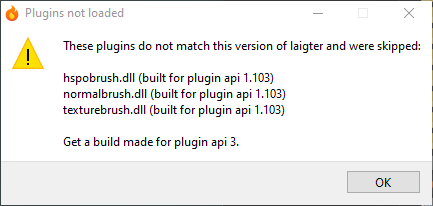
Expected behaviour?
guess who can't read!!! it's me!!!!
Hey! were you able to get the new plugins? Or just delete them if you dont use it
Hi, this tool is great.One question, would it work with pixel art as well? I mean, it doesn't just create the sprite's edges, but the internal details as well?
It can work with pixel art, depending of the art and the settings, contact me in discord if you want me to test with some of your sprites, to see if you are convinced by the result!
Hey, thanks for the feedback.It would be great if you could test it.
I'll send you some artwork to test in Disc soon.Thank you very much.
The latest build bought from itchio, fails to load the normal from the .laigter project file.
I am not sure how I can reopen and edit things after that. I cannot regenerate the map from the sliders, or reimport just the normal map from a previous export.
To test it, just open the software, import an image, and then save the project. Open the project again, you'll see that the normal information is lost and nothing you do in the editor will bring it back.
Sorry for the inconvenience, Ill work to fix it asap.
Hey, can you check new version on itch? Hope it fixes your issue!
Not on my desk at the moment. I will update you as soon as I’m back. Thanks a lot for the quick response.
Use this all the time instant purchase great stuff
Thanks! Im really glad you like it!
Excellent application. I was surprised it actually worked on mac without any issues.
nice tool, thanks!
Thanks!
I'll check it out now. Thanks for the opportunity, friend.
Have you considered adding a “neutral” dark theme that doesn’t have any hue or saturation applied?
not really, but im open for it. Ill search for a good color palette to see if i can add it!
I’d be willing to help, I have a bit of ui design and theming experience you just need to let me know what I need to deliver.
Hey thanks for this software! I wanted to let you know that it does not work under wayland and only works with X11 sessions. What I found is the app image bundles Qt5 libraries, but does not include a wayland platform plugin or a properly configured EGL/GL path for proprietary NVIDIA drivers.
After I extracted it and ran from the command line, I found that your image falls back to mesa llvmpipe, which is software rendering and causes a blank window and shader failures. Happy to help diagnose if needed since wayland is most likely the future display protocol for the X server and I imagine you would want it to work properly.
hey! thanks for reporting. Can you report this on github?
Also, have you tried the appimage from github? i ported it to Qt 6
Ok version 1.12.1 is working fine under Wayland. The latest version linked here is 1.11.0 which is the one that did not run. Thanks for letting me know and it looks like you just need to update itch.
is there a way to use my own normal maps? i want to see how they look.
it would also be cool to let you limit the normal map palette to only a few colors to make shading smoother.
thank you so much for making it, one of my favorite softwares out there, :)
No way to use your own normal map, but i guess you could use any game engine for that, like godot.
Ive been trying to add an option to limit the pallete but no success so far.
there is no about tab on the software so how ca i see the my laigter version ?
hey, this button is the "About" section

hey first time this not appear . only appear after you telling this what you do ? are you a magician :)
good software why no updates
I have more updates in github, still didnt had time to upload them here.
ok
i get that and this software is very useful for me thank you !
very helpful and looks amazing, I really love it. thanks for making it free :D
Hi, i saw a bug or something not really clear. If i use the preview and move the light after that i can't change any parameter anymore.
Hi! is not a bug. Given that you can have more than one sprite opened at the same time, you have to select the sprite you want to change the settings to. So just click on the sprite you want to modify after moving the light.
Ok thank you.
I think i found instead a bug. Take a normal map, use the checkmark for alpha, so enable it. Now load a new image you can see the checkmark is still there but the alpha is not applied to use it you have to click to remove the mark and click again to enable. The program is great, mine are just suggestions like a whole parameter resets button that could help too.
ah ok, ill take a look at that
Incredible app, I absolutely love it :]
Thanks!
Amazing app!
is there a way to exclude cyan color to make rpgmakeresque maps for walls?
Im not familiar with rpgmaker maps, can you share me an example?
thank you for your response but i alredy fixed the problem
Very useful, thank you for your work!
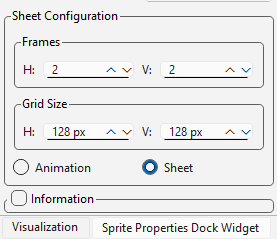
Is there a way I can use this on tilemaps of a fixed size eg 16x16?
Hey, right now the tilemap feature works only with the number of tiles instead of the size. This is something i should add.
I added this, so you can config the size instead of the number of frames:
expect it in the new version :)
mmm the image did not appear
Show post...
those who know: 💀
I'm a true beginner at this, I can't find the export options shown in YouTube tutorials, the save button saves a dotlaigter file that Godot doesn't recognize. I don't get it...
Edit: okay so, I didn't see the "Target Directory" option, thanks for this great tool Azagaya
Very nice tool, thank you! I was wondering if anyone can direct me to a tutorial on how to achieve the pixelated+toon type lighting in Godot 4? I'm guessing it involves some shader work but I can't find any instructions on how to do it.
Hope it's what are you looking for.
Thank you so much!
The tool is really useful, thank you for developing it! I did notice however, that scaling sprites up will not affect the size of the export. This seems to be intentional as per the documentation, but I was wondering if applying this onto the export files would be possible to add?
Linux: laigter 1.11 keeps crashing after import image
the one 1.10.7 from github works ok.
great work
My laigter program keeps shutting down when I import a laigter file.
Can you share me the file that is giving you issues?
The only setback is having to redo the entire texture, other than that no problem. I have a laigter file, how do I share it?
you can join the discord and send it there, or maybe through filebin or something similar?
Totally forgot about file bin. Shared 2 files. Both causing the same problem.
https://filebin.net/saysrozvauvwqnug
Thanks, ill check them on the weekend
Thank you for the wonderful tool! This is seriously awsome.
One suggestion or feature requests that I would have is that the Tile Sheets options could be expanded a bit:
- It would be nice if the H and V options could go higher than 99. I am currently splitting the sheets manually before importing them to Laigter, but it would be nice to just have it work without having to do that.
- It would also be nice to just be able to input the tile size height and width directly. The sprite sheets I use all vary in size, so now I have to manually calculate the horizontal and vertical splits for each one.
- It would be really cool if the individual tile cells could be combined to make different sized and shaped individual cells, sort of like it works in Godot's tilesets/tilemaps.
But if this is the only critique I have, then I think that means you have done an amazing job. :)
Thanks for the feedback! At the moment im only doing maintenance of the tool (fixing bugs) because of lack of time, but perhaps the first two requests are simple enough to add them.
This is awesome for a solo dev like me doing some art, it improve so much my game, thank you for this amazing tool !
I'm glad you find it helpful!
This is great. Saved me so much time manually making normal maps for my pixel art game :)
Im glad you found it useful!
Hi, is possible make a red mask with laigter? some tuto's? thank for sharing laigter save me s2!
Hi! I'm not sure what you mean with a red mask. Can you elaborate please?
I'm glad you found Laigter useful btw!
Mmm, no, laigter doesnt have something to create such a texture. Maybe you can try with a specular map, but youll need to change the color by hand.
Hi! I have a question, I couldn't run the the app on my mac. What version would I need for this?
I dont have access to a mac anymore to compile and test the project. You can try the app from here https://github.com/azagaya/laigter/releases (laigter.zip), but i cannot do much if it doesnt work, because i cannot test it myself anymore on Mac... Sorry
thanks so much for your reply, that did help! And thank you so so much again, cause this has literally just saved me hourssss of work!
Im glad it worked!
Is there a way to convert textures in batch?
If they are many files, you can use the cli to process a list of files, or all the files in a directory.
It took me to much time to find this omg
muy cheto esto!!!
Gracias!
Olá, adorei o software, é fácil e pratico, e talvez algum dia eu poderia usá-lo em um possível jogo no futuro.
Mas estou um pouco confuso na parte de licença do software, se eu apenas usar ele para criar o normal map do Sprites do meu jogo, o que eu devo fazer? devo colocar os créditos? (o que obviamente eu vou dar o créditos, pois isso ajuda bastante na produção de um game!). Meu jogo pode ser pago se eu usar esse programa nos Sprites do meu jogo?
mas é um ótimo programa! só estou com essa duvida mesmo.
Hi! The license only applies to the code of the software. You have all the rights to use whatever map you generate with it (as long as you have the rights to use the original image where you generated it from.
So, if you use laigter to generate a normal map from a sprite you have legal right to use, you can use those normal maps in your games, even commercially, without need to give attribution or anything. The maps you generate with laigter are yours.
The license only apply to the code of the tool, not its output.
TRANSLATED WITH GOOGLE:
Oi! A licença se aplica apenas ao código do software. Você tem todos os direitos de usar qualquer mapa que gerar com ele (desde que tenha os direitos de usar a imagem original de onde a gerou). Então, se você usar o laigter para gerar um mapa normal a partir de um sprite que você tem direito legal de usar, você poderá usar esses mapas normais em seus jogos, mesmo comercialmente, sem necessidade de dar atribuição nem nada. Os mapas que você gera com o laigter são seus. A licença se aplica apenas ao código da ferramenta, não à sua saída.
installed windows exe 1.11.0. I love it except for one minor (major) issue. I can't get the toolbar or export widget to show up. When I make the toolbar visible only the 3 plugin options show up (and seem to work just fine with the available brush plugins) but nothing else, no save, load, zoom, etc. Also, there is no "export" even listed in the visibility list.
Hey! Can you share me a screenshot of the problem? Can you join the Discord server (link in the tool page) and send me details of the issue over there?
Hi azagaya, thank you for the tool. I have a suggestion and would be happy to tip you $50 to $100 if you can implement this.
Is it possible to use a limited color palette to make normal map for pixel art? It will make your tool perfect for pixel art.
Examples of limited color palette for pixel art:
Hi,
Is this for the normal brush? Or you want the generated normals to be limited to those colors?
I want the generated normals to be limited to those colors.
Ok, ill try to work on it for next release!
Thank you so much! I believe this feature will make pixel art look a lot better. I have tipped you $30 on kofi for now.
Maybe you can use these 2 limited color palettes.
Coarse palette:
Fine palette:
Oh thanks a lot! That wasn't necessary! Also, have in mind that i work on laigter on my free time. These changes can take a while to be implemented.
I this is the first tool to generate normal maps that I've ever come across that works on Linux. Good stuff too!
This is a very good tool. Thank you 🤗
Thanks! Im glad you like it!
I am curious how this works. Do you have any links to papers or something naming and explaining the techniques?
Looking through the code I guessed that the shaders just render the images with lighting using the generated normal, spec, POM, maps? Are the calculations actually all done in `fshader.glsl`? or is there some CPU image processing somewhere else? I'll keep digging.
I wanted to try applying it to image masking or see if there's a way to do something like it in real time with a shader on the GPU.
Hi!
fshader.glsl only does the rendering. The maps are calculated in the CPU using cimg image processing library. All the code is in image_procecssor.cpp. For the normals, is basically obtaining a heightmap from a distance transform, and the grayscale version of the image, and then using derivative opperators to get the normals.
Everything could be done in shaders (the most difficult part would be the distance transform, which i guess you could do with SDF?). I tried in the past to migrate everything to shaders, but the changes were too much and i didnt have the time. I also never sorted out how to do cli exports without a window if they depend on OpenGL, so CPU was better for that.
I suggest you keep it in CPU because it is not intended for real-time but to export. If you achieve a GPU version my personal preference is have the possibility to switch between GPU and CPU. Because it can give different results, so I prefer to have the ability to choose.
Yeah, thanks for the suggestion. I don't have any plan to change the generation for the time beign to GPU, so it will still be done in CPU in the future.